Voice light controller
uni · SIT210 · T1 2026You say “turn on the bathroom light” and the bathroom LED comes on. A Mac records what you say. A Raspberry Pi 5 sends the clip to ElevenLabs for text, asks Gemini which command you meant, and reads a short reply out loud. Then it tells an Arduino over Bluetooth Low Energy which LED to switch.

Task 8.1HD in SIT210, Embedded Systems Development, at Deakin. The unit's tasks share one made-up scenario: Linda, who lives in a retirement village. In task 1.1P she got a button that lights the porch and hallway. Here she asks out loud for the bathroom light, the hallway light or the fan.
The first version, committed late on 10 Apr 2026, was a typed menu on the Pi: enter 1 to 9 and it wrote that command over BLE. The voice version replaced it later that night. It ran on the bench with the real boards for the unit's demo video. The boards were not available for this write-up, so there are no screenshots. This page shows the code, two diagrams, and the parts I could run on a laptop with no boards and no AI service.
On the Mac you press Enter to start recording and Enter again to stop. The script saves a 16 kHz mono WAV and sends the raw bytes to the Pi on TCP port 9876. There is no length header. The Mac closes the socket and the Pi reads until the stream ends.
The Pi then makes three cloud calls in a row: speech to text, text to a command, and a spoken reply. Only after the reply does it write the command to the Arduino, as a BLE write with response.
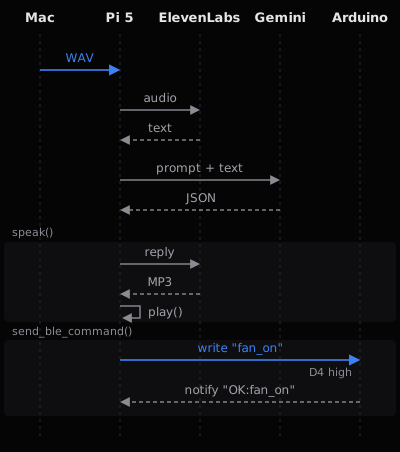
Gemini gets a system prompt that lists the commands and asks for JSON only. Part of it:
Available commands:
- bathroom_on / bathroom_off
- hallway_on / hallway_off
- fan_on / fan_off
- all_on / all_off

Rules:
- If the intent is clear, return: {"command": "bathroom_on", "response": "Turning on the bathroom light."}
- If ambiguous or unclear, return: {"command": null, "response": "Sorry, I didn't catch that. Could you say it again?"}
- "response" is what will be spoken back to Linda. Keep it short and natural.
- Return ONLY valid JSON. No markdown, no explanation, no backticks.
The prompt says no markdown, but the parser strips code fences anyway before it parses the JSON.
def parse_intent(transcript: str) -> dict:
    """Send transcript to Gemini, get back structured command."""
    response = gemini_client.models.generate_content(
        model="gemini-2.5-flash-lite",
        config=types.GenerateContentConfig(system_instruction=SYSTEM_PROMPT),
        contents=f"User said: \"{transcript}\""
    )
    raw = response.text.strip().replace("```json", "").replace("```", "").strip()
    print(f"[Gemini] {raw}")
    return json.loads(raw)
The Arduino advertises as LightController with one service and two characteristics: one the Pi writes commands to, and one the Arduino updates with its result, which the Pi subscribes to. At start-up the Pi scans for that name for up to 10 seconds. Before each write it reconnects if the link has dropped.
async def send_ble_command(command: str):
    global ble_client
    if ble_client is None or not ble_client.is_connected:
        print("[BLE] Reconnecting...")
        await connect_ble()
    async with ble_lock:
        await ble_client.write_gatt_char(
            CMD_CHAR_UUID,
            command.encode("utf-8"),
            response=True
        )
        print(f"[BLE] Sent: {command}")
On the board, the loop trims each written string and hands it to one function. Each command sets the status string the Pi is notified of, and prints one line to the serial monitor.
void handleCommand(String cmd) {
  String response = "";

  if (cmd == "bathroom_on") {
    bathroomState = true;
    digitalWrite(BATHROOM_LED, HIGH);
    response = "OK:bathroom_on";
  // ... five more the same shape (bathroom_off, hallway_on,
  // hallway_off, fan_on, fan_off), then all_on and all_off via setAll()
  } else if (cmd == "status") {
    response = getStatus();
  } else {
    response = "ERR:unknown_command";
  }

  statusCharacteristic.setValue(response);
  Serial.println("CMD: " + cmd + " | RES: " + response);
}
I ran these on 28 Oct 2026 from a fresh clone. First, the Arduino's handleCommand() and its state, copied unchanged out of program.ino and compiled on a Mac against a small stand-in for the Arduino library. The stand-in records the pin writes and the status string.
write "bathroom_on"
  notify: OK:bathroom_on   pins D2 D3 D4 = 1 0 0
write "fan_on"
  notify: OK:fan_on   pins D2 D3 D4 = 1 0 1
write "status"
  notify: STATUS:bathroom=1,hallway=0,fan=1   pins D2 D3 D4 = 1 0 1
write "all_off"
  notify: OK:all_off   pins D2 D3 D4 = 0 0 0
write "status"
  notify: STATUS:bathroom=0,hallway=0,fan=0   pins D2 D3 D4 = 0 0 0
write "hallway_on\r\n"
  notify: OK:hallway_on   pins D2 D3 D4 = 0 1 0
write "Bathroom_On"
  notify: ERR:unknown_command   pins D2 D3 D4 = 0 1 0
write "kitchen_on"
  notify: ERR:unknown_command   pins D2 D3 D4 = 0 1 0
Next, the Mac's save_wav() and send_to_rpi() talking to the Pi's receive_audio_file() over loopback. A 2.5 second test tone stood in for the microphone, and the port was moved off 9876.
[Net] Sending 80044 bytes to 127.0.0.1:3425...
[Net] Sent. Waiting for RPi to process...
sent     80044 bytes  sha256 a6d531f6b680c7b1
received 80044 bytes  sha256 a6d531f6b680c7b1
identical
Last, I ran the real process_audio() and parse_intent(), with fakes for ElevenLabs, Gemini and the Bluetooth write that record what would have been said and sent. I typed the Gemini replies myself to reach each code path; none came from Gemini. The last case runs the real send_ble_command() with the board scan stubbed to find nothing. On the Pi that scan would first wait up to 10 seconds.
[fenced JSON]
  speak  'Turning on the fan.'
  ble    'fan_on'
[command null]
  speak  "Sorry, I didn't catch that. Could you say it again?"
[text before JSON]
  log    [ERROR] Gemini bad JSON: Expecting value: line 1 column 1 (char 0)
  speak  'Something went wrong. Please try again.'
[name not in sketch]
  speak  'Turning on the kitchen light.'
  ble    'kitchen_on'
[empty transcript]
  speak  "I didn't hear anything. Please try again."
[Arduino out of range, real send_ble_command]
  speak  'Turning on the bathroom light.'
  log    [ERROR] 'NoneType' object has no attribute 'write_gatt_char'
  speak  'Sorry, there was an error.'
Two of those cases show the same gap. The reply is spoken before the Arduino answers. If Gemini ever names a command the sketch does not have, the user hears “Turning on the kitchen light” and nothing happens; the board's ERR:unknown_command only reaches the Pi's log. With the board out of range, the user hears the light confirmed and then an error.
Check the command against the sketch's list before saying anything, and speak only after the Arduino's OK comes back, so the voice never confirms a switch that did not happen. The sketch also answers a status command that the prompt never offers, so asking “is the fan on?” cannot work yet. And pressing Enter on a laptop is not hands-free; a wake word on the Pi would suit the scenario better.